Kristin Standiford
Microsoft Store for Small Business
Bridging consumer behavior and administrative needs for SMB order management
Role: Lead UX DesignerTeam: Product, Engineering, Marketing, DesignPlatform: Microsoft.com
Goal
Enable small businesses to easily track and manage purchases.
The problem
Microsoft began enabling verified small businesses (under 25 employees) to purchase products through the existing consumer web store platform at discounted rates.
While these customers shop like consumers, their post-purchase needs are more administrative. Small businesses often require clearer transaction records, visibility into purchases made by team members, and access to recipient and fulfillment details.
Microsoft’s existing order management interfaces served two very different audiences:
- Consumers – simple purchase histories
- Enterprise IT professionals – complex administrative dashboards
Small business purchasers fell into the gap between the two.
Design challenge
How might we provide small businesses with clear administrative order information within the same familiar store environment where purchases were made?
This challenge was further complicated by platform limitations. Certain advanced capabilities—including license management, returns, and line-item cancellations had to remain on the enterprise platform or be handled through customer support.
The experience therefore needed to provide meaningful order visibility while operating within these technical constraints.
Solution approach
I designed the SMB post-purchase experience around familiar consumer purchase flows, ensuring the interface remained approachable while supporting the additional clarity small businesses require.
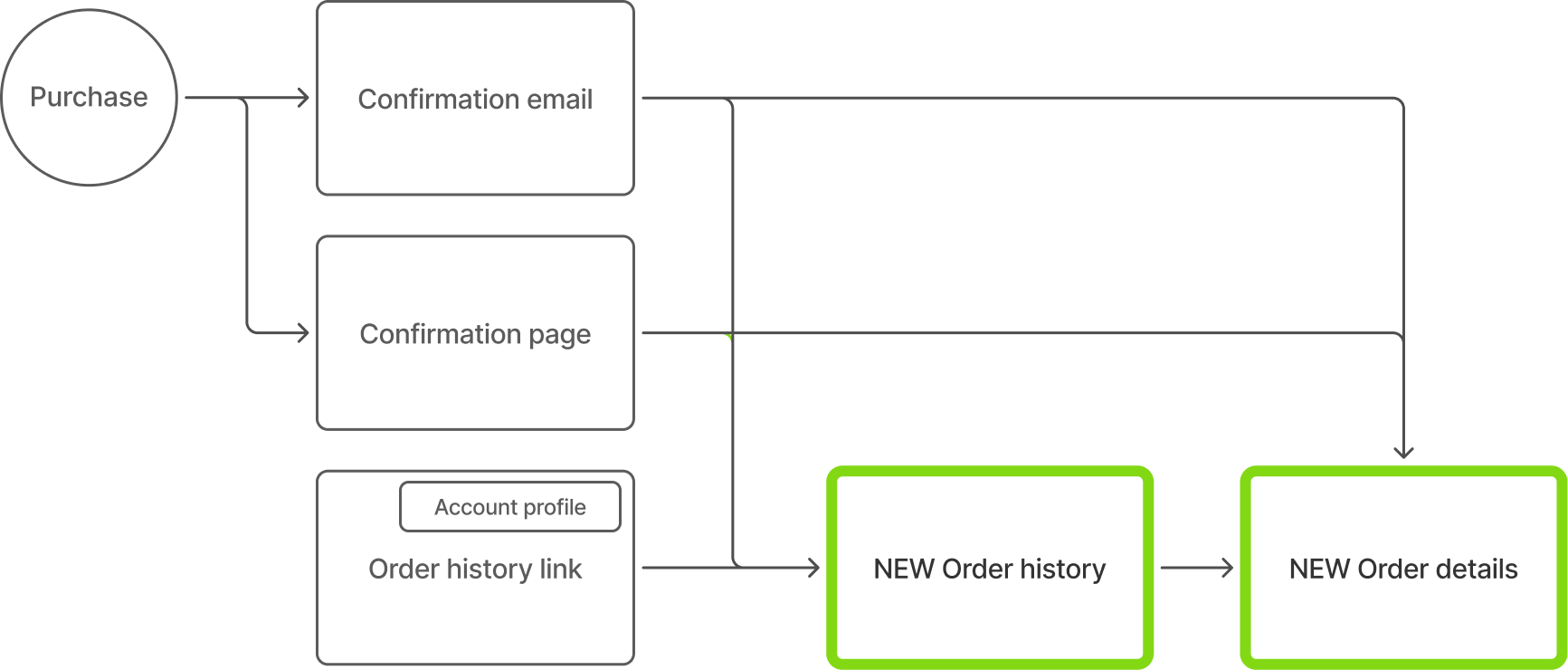
After completing a purchase, users could access order information through three entry points:
- Email receipt containing a direct order link
- Order confirmation page immediately after purchase
- A new order history entry point added to the account navigation header for repeat visits
This approach ensured small businesses could easily revisit order information without introducing a separate administrative system.
Deliverables
My contribution defined two new experiences:
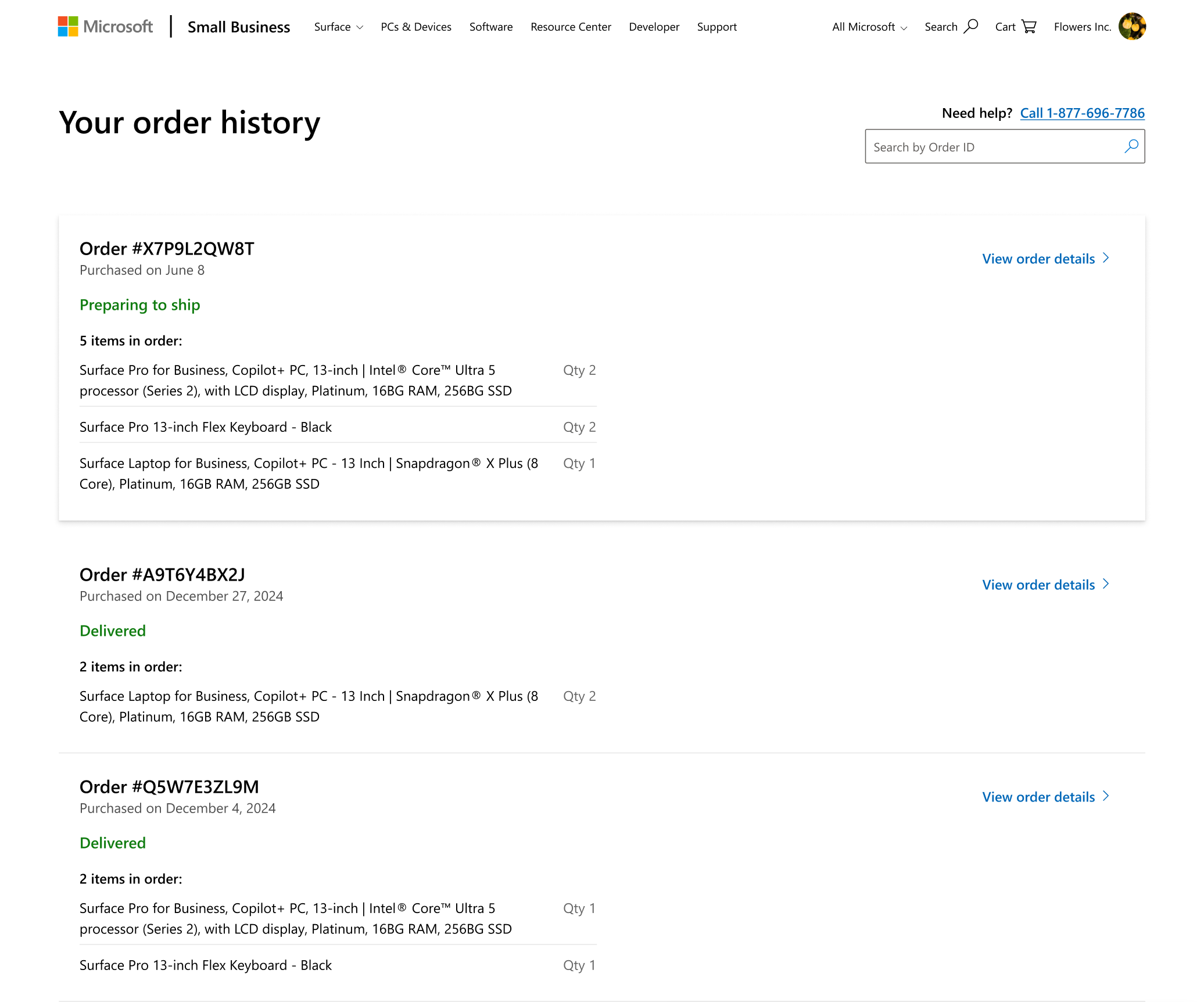
Order history: a consolidated list view of previous purchases.
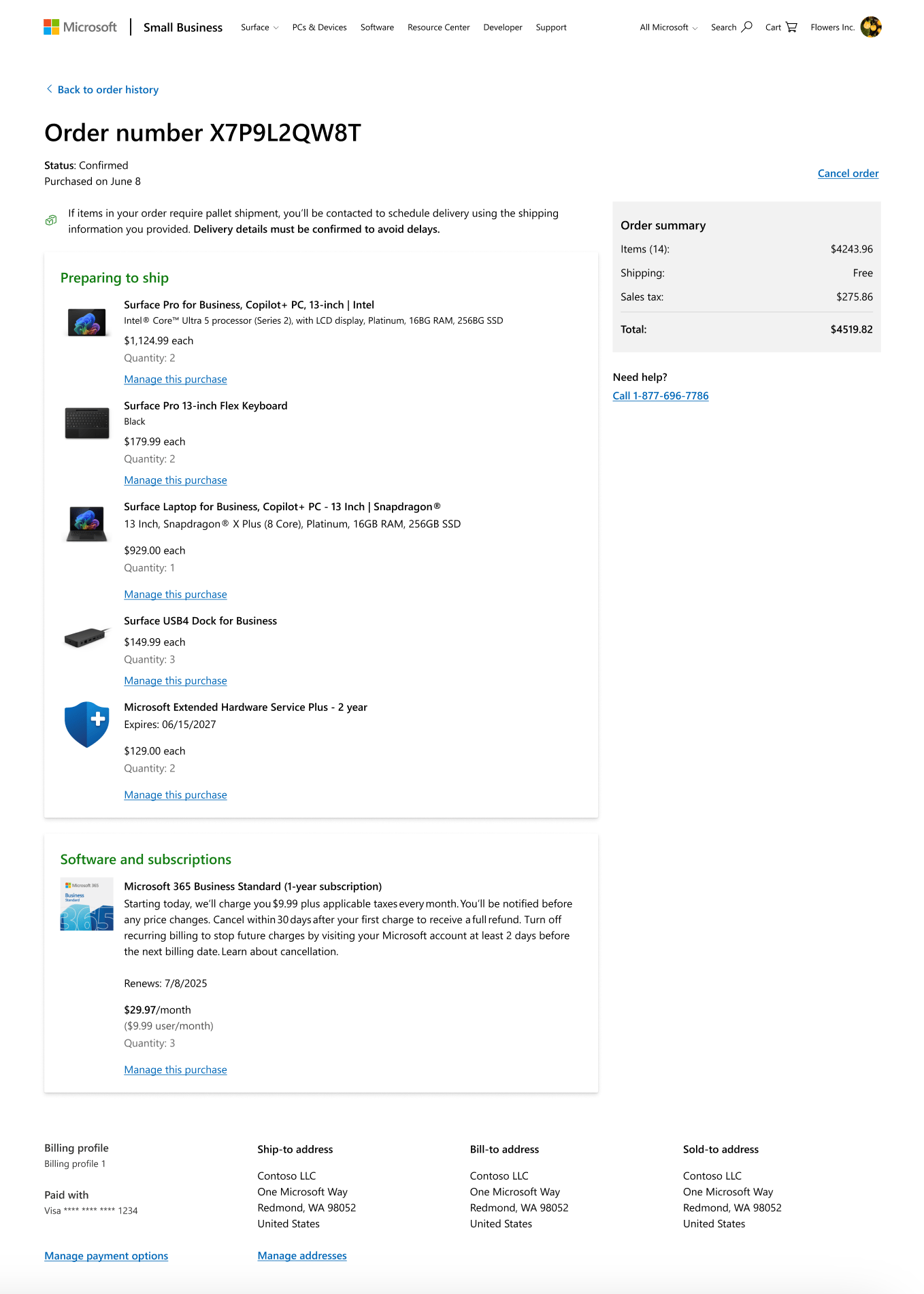
Order details: A transaction-specific page showing itemization, status, and purchaser/recipient information.
Order history
I defined the content hierarchy through user stories such as:
“As a small business purchaser, I want to easily scan previous orders and quickly access transaction details.”
This informed the layout priorities:
- Order number
- Purchase date
- Item summary
- Fulfillment status
- Direct link to detailed order information
To improve scannability, I introduced visual cues such as color and elevation to distinguish in-progress orders from completed transactions.
Ecommerce benchmarks informed my layout, and my expertise in accessibility and responsive design ensured consistency and usability across viewports.
Order details
The order details experience provided more information per transaction, allowing purchasers to view key information and perform basic actions.
I structured the layout around needs such as:
“As a small business purchaser, I want to quickly understand what was purchased, who it was for, and the status of the order.”
To maintain continuity with the consumer store experience, the page included:
- Product imagery and descriptions
- Quantity and pricing details
- Cost summary
- Purchaser profile and payment method
- Billing, shipping, and sold-to address details
For the initial launch, cancelation was intentionally scoped to the order-level when items had not yet been fulfilled.
More advanced actions—including license management, provisioning, and returns—remained on the enterprise platform and were accessible through contextual links.
Release and next steps
This experience is scheduled to launch in late 2026. For the initial release, I focused the design on clear order visibility and essential transaction details while establishing a scalable foundation for future SMB commerce capabilities.
Key takeaways
This project demonstrates my ability to:
- Translate small business post-purchase needs into a cohesive experience aligned with the pre-purchase journey
- Design solutions that support SMB workflows while operating within existing platform constraints
- Define an MVP that establishes a scalable foundation for future order-management capabilities
Return to all projects →
Kristin Standiford
Microsoft Store for Small Business
Bridging consumer behavior and administrative needs for SMB order management
Role: Lead UX DesignerTeam: Product, Engineering, Marketing, DesignPlatform: Microsoft.com
Goal
Enable small businesses to easily track and manage purchases.
The problem
Microsoft began enabling verified small businesses (under 25 employees) to purchase products through the existing consumer web store platform at discounted rates.
While these customers shop like consumers, their post-purchase needs are more administrative. Small businesses often require clearer transaction records, visibility into purchases made by team members, and access to recipient and fulfillment details.
Microsoft’s existing order management interfaces served two very different audiences:
- Consumers – simple purchase histories
- Enterprise IT professionals – complex administrative dashboards
Small business purchasers fell into the gap between the two.
Design challenge
How might we provide small businesses with clear administrative order information within the same familiar store environment where purchases were made?
This challenge was further complicated by platform limitations. Certain advanced capabilities—including license management, returns, and line-item cancellations had to remain on the enterprise platform or be handled through customer support.
The experience therefore needed to provide meaningful order visibility while operating within these technical constraints.
Solution approach
I designed the SMB post-purchase experience around familiar consumer purchase flows, ensuring the interface remained approachable while supporting the additional clarity small businesses require.
After completing a purchase, users could access order information through three entry points:
- Email receipt containing a direct order link
- Order confirmation page immediately after purchase
- A new order history entry point added to the account navigation header for repeat visits
This approach ensured small businesses could easily revisit order information without introducing a separate administrative system.
Deliverables
My contribution defined two new experiences:
Order history: a consolidated list view of previous purchases.
Order details: A transaction-specific page showing itemization, status, and purchaser/recipient information.
Order history
I defined the content hierarchy through user stories such as:
“As a small business purchaser, I want to easily scan previous orders and quickly access transaction details.”
This informed the layout priorities:
- Order number
- Purchase date
- Item summary
- Fulfillment status
- Direct link to detailed order information
To improve scannability, I introduced visual cues such as color and elevation to distinguish in-progress orders from completed transactions.
Ecommerce benchmarks informed my layout, and my expertise in accessibility and responsive design ensured consistency and usability across viewports.
Order details
The order details experience provided more information per transaction, allowing purchasers to view key information and perform basic actions.
I structured the layout around needs such as:
“As a small business purchaser, I want to quickly understand what was purchased, who it was for, and the status of the order.”
To maintain continuity with the consumer store experience, the page included:
- Product imagery and descriptions
- Quantity and pricing details
- Cost summary
- Purchaser profile and payment method
- Billing, shipping, and sold-to address details
For the initial launch, cancelation was intentionally scoped to the order-level when items had not yet been fulfilled.
More advanced actions—including license management, provisioning, and returns—remained on the enterprise platform and were accessible through contextual links.
Release and next steps
This experience is scheduled to launch in late 2026. For the initial release, I focused the design on clear order visibility and essential transaction details while establishing a scalable foundation for future SMB commerce capabilities.
Key takeaways
This project demonstrates my ability to:
- Translate small business post-purchase needs into a cohesive experience aligned with the pre-purchase journey
- Design solutions that support SMB workflows while operating within existing platform constraints
- Define an MVP that establishes a scalable foundation for future order-management capabilities
Return to all projects →
Kristin Standiford
Microsoft Store for Small Business
Bridging consumer behavior and administrative needs for SMB order management
Role: Lead UX DesignerTeam: Product, Engineering, Marketing, DesignPlatform: Microsoft.com
Goal
Enable small businesses to easily track and manage purchases.
The problem
Microsoft began enabling verified small businesses (under 25 employees) to purchase products through the existing consumer web store platform at discounted rates.
While these customers shop like consumers, their post-purchase needs are more administrative. Small businesses often require clearer transaction records, visibility into purchases made by team members, and access to recipient and fulfillment details.
Microsoft’s existing order management interfaces served two very different audiences:
- Consumers – simple purchase histories
- Enterprise IT professionals – complex administrative dashboards
Small business purchasers fell into the gap between the two.
Design challenge
How might we provide small businesses with clear administrative order information within the same familiar store environment where purchases were made?
This challenge was further complicated by platform limitations. Certain advanced capabilities—including license management, returns, and line-item cancellations had to remain on the enterprise platform or be handled through customer support.
The experience therefore needed to provide meaningful order visibility while operating within these technical constraints.
Solution approach
I designed the SMB post-purchase experience around familiar consumer purchase flows, ensuring the interface remained approachable while supporting the additional clarity small businesses require.
After completing a purchase, users could access order information through three entry points:
- Email receipt containing a direct order link
- Order confirmation page immediately after purchase
- A new order history entry point added to the account navigation header for repeat visits
This approach ensured small businesses could easily revisit order information without introducing a separate administrative system.
Deliverables
My contribution defined two new experiences:
Order history: a consolidated list view of previous purchases.
Order details: A transaction-specific page showing itemization, status, and purchaser/recipient information.
Order history
I defined the content hierarchy through user stories such as:
“As a small business purchaser, I want to easily scan previous orders and quickly access transaction details.”
This informed the layout priorities:
- Order number
- Purchase date
- Item summary
- Fulfillment status
- Direct link to detailed order information
To improve scannability, I introduced visual cues such as color and elevation to distinguish in-progress orders from completed transactions.
Ecommerce benchmarks informed my layout, and my expertise in accessibility and responsive design ensured consistency and usability across viewports.
Order details
The order details experience provided more information per transaction, allowing purchasers to view key information and perform basic actions.
I structured the layout around needs such as:
“As a small business purchaser, I want to quickly understand what was purchased, who it was for, and the status of the order.”
To maintain continuity with the consumer store experience, the page included:
- Product imagery and descriptions
- Quantity and pricing details
- Cost summary
- Purchaser profile and payment method
- Billing, shipping, and sold-to address details
For the initial launch, cancelation was intentionally scoped to the order-level when items had not yet been fulfilled.
More advanced actions—including license management, provisioning, and returns—remained on the enterprise platform and were accessible through contextual links.
Release and next steps
This experience is scheduled to launch in late 2026. For the initial release, I focused the design on clear order visibility and essential transaction details while establishing a scalable foundation for future SMB commerce capabilities.
Key takeaways
This project demonstrates my ability to:
- Translate small business post-purchase needs into a cohesive experience aligned with the pre-purchase journey
- Design solutions that support SMB workflows while operating within existing platform constraints
- Define an MVP that establishes a scalable foundation for future order-management capabilities
Return to all projects →