Microsoft Store
Reducing purchase friction with guest checkout
Role: Lead UX DesignerTeam: Product, Engineering, Marketing, DesignPlatforms: Microsoft.com and Xbox.com
GoalReduce purchase friction and increase sales by enabling guest checkout.
Impact
- Orders increased 20%
- Revenue increased 22%
- $18.2M projected annual revenue from Microsoft.com
- $6M projected revenue over 3 years from Xbox.com

The problem
Microsoft’s consumer web store historically required customers to sign in with an account before continuing to checkout. While this supported account growth and ecosystem engagement, it also introduced friction for users.
Customers without an account—or those who didn’t recall they had one—frequently abandoned their carts.
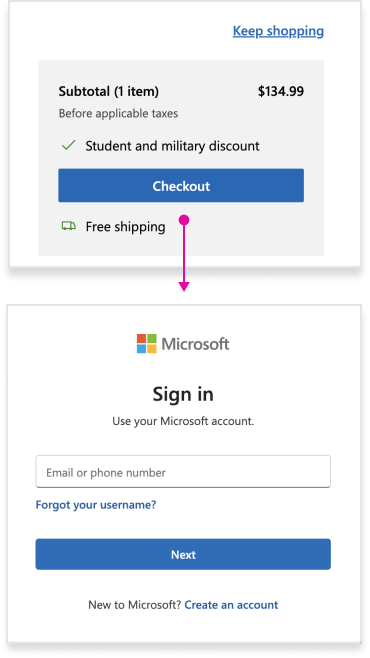
Guest checkout is a standard feature among competitors, so Microsoft shifted strategy to capture more sales by removing barriers during purchase and deferring account sign in or creation during product setup.
Scope
Because guest purchases are not tied to a Microsoft account, the feature also required new web store post-purchase pages that allowed guests to:
- See order details
- Make returns or cancellations
These experiences needed to maintain parity with account-based order management.
Key design decisions
Designing guest checkout required balancing business goals, platform constraints, and long-term scalability. Three decisions shaped the final solution:

Entry point
Where and when to present the guest checkout option.

Cohesion
Ensuring post-purchase experiences felt consistent with the shopping journey.

Speed to Launch
Designing within existing platform constraints to avoid delaying the release.
Checkout entry point
Common industry patters included:
- Guest checkout, account checkout, and account creation directly on the cart page
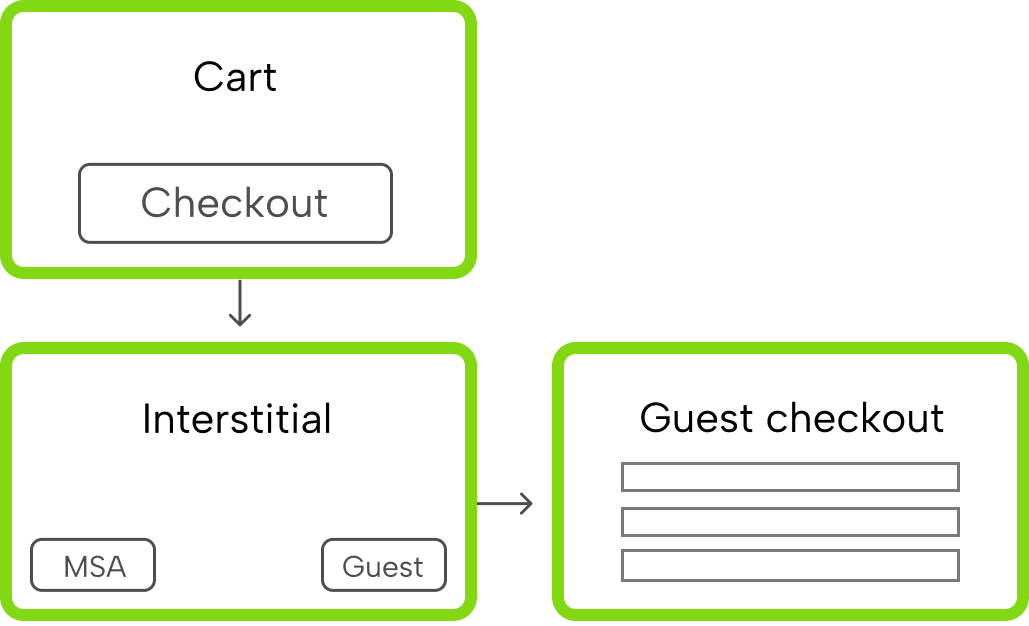
- Interstitial pages between cart and checkout that offered multiple purchase paths
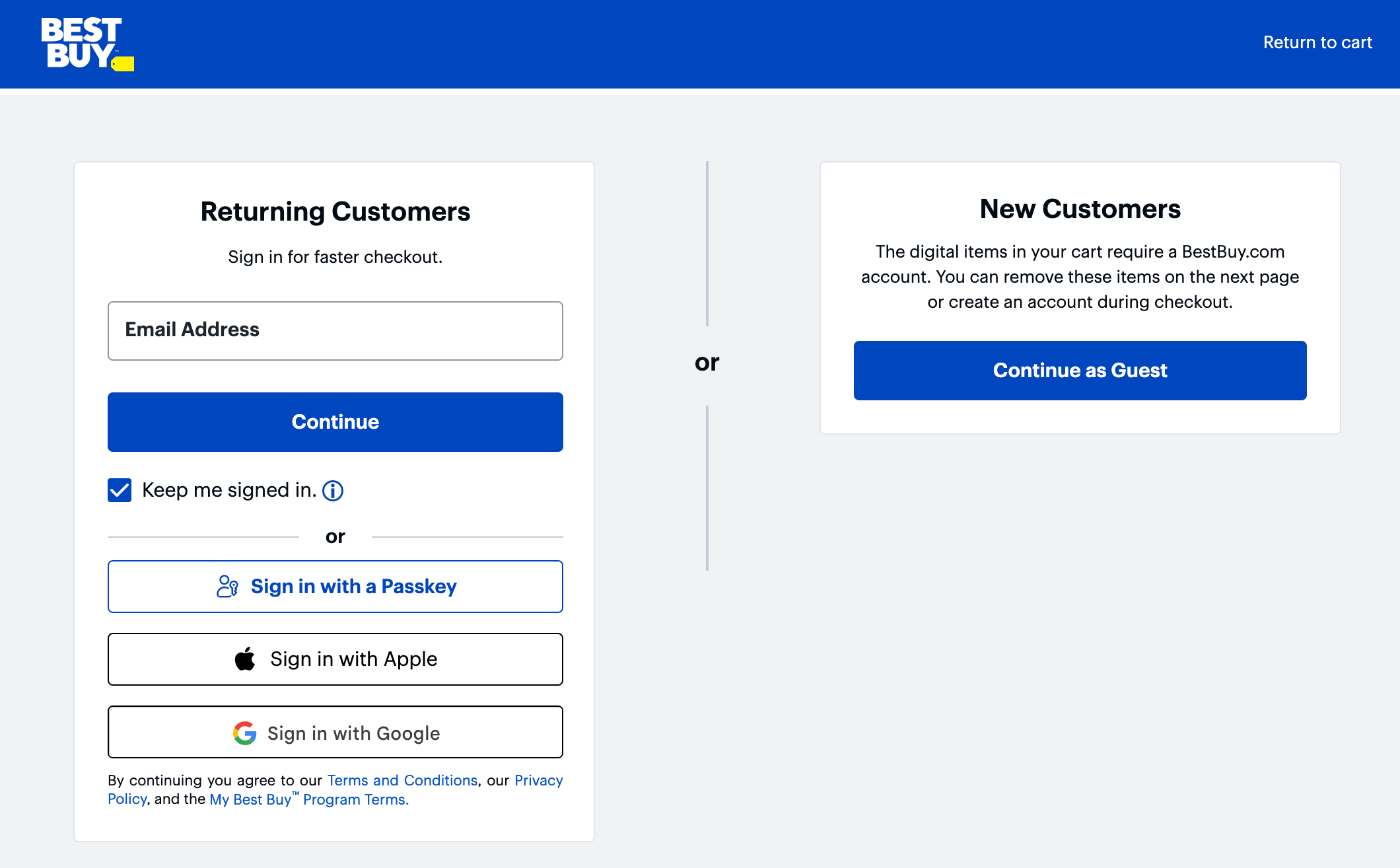
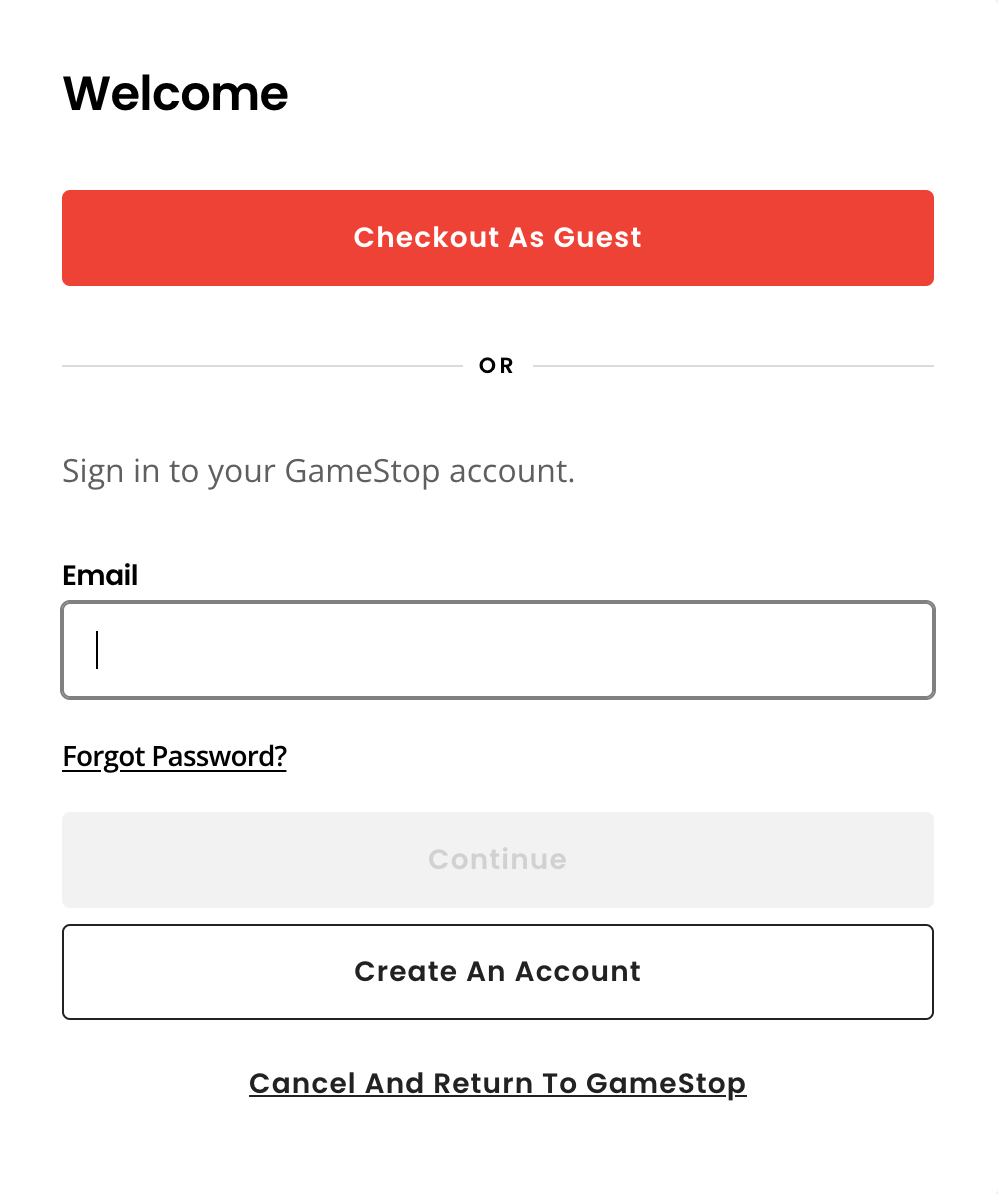
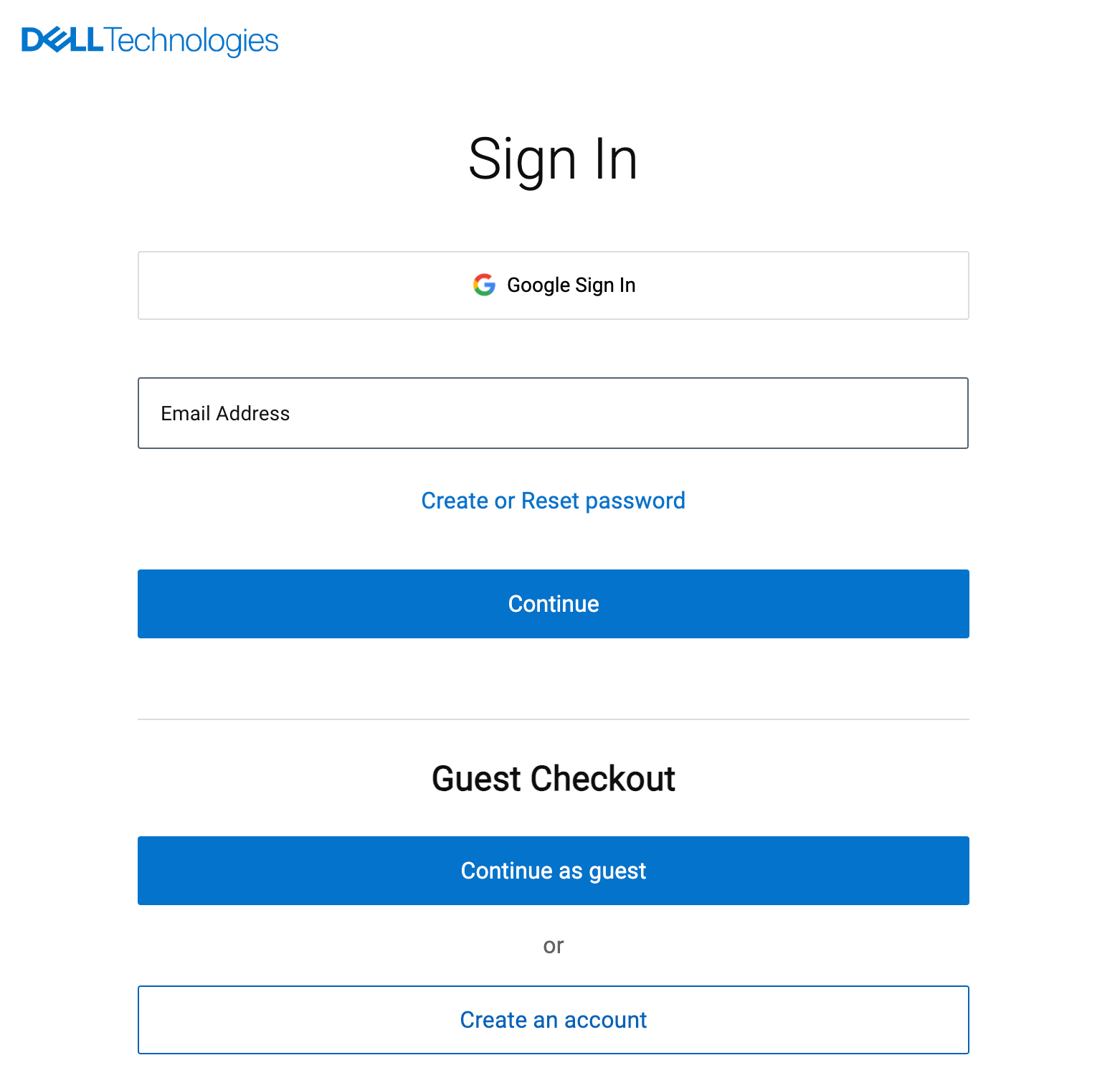
I explored introducing an interstitial page between cart and checkout that could also support future payment options such as Apple Pay, Google Pay, and PayPal.
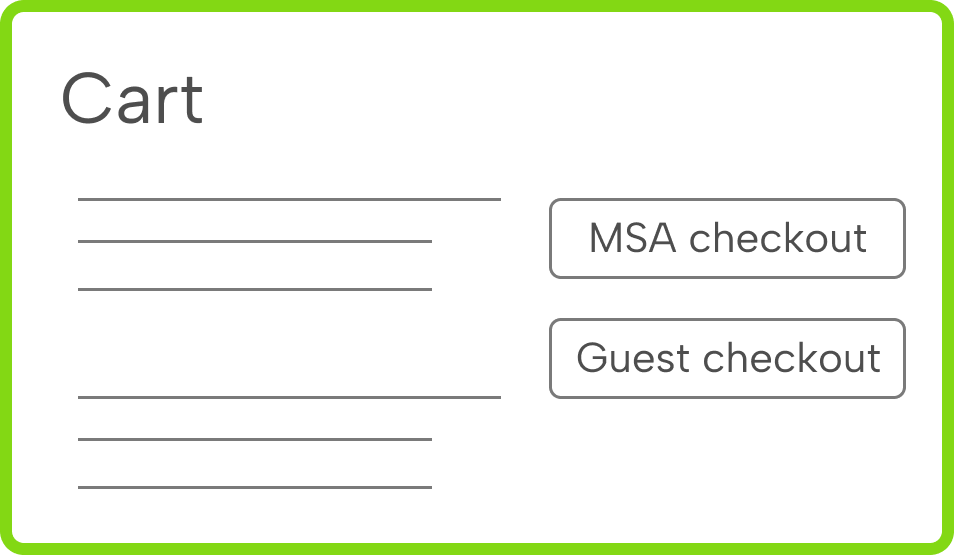
However, because guest checkout was new for Microsoft customers—and the business still emphasized purchasing while signed into a Microsoft account—I surfaced both checkout options directly on the cart page.
This ensured customers clearly understood their choices while maintaining neutral positioning between the two paths.
Cohesive post-purchase experience
Microsoft’s existing order management experiences lived on various account-based platforms with different design systems, none of which matched the web store’s patterns.
I advocated for creating a new experience that remained consistent with the web store where guest purchases were completed.
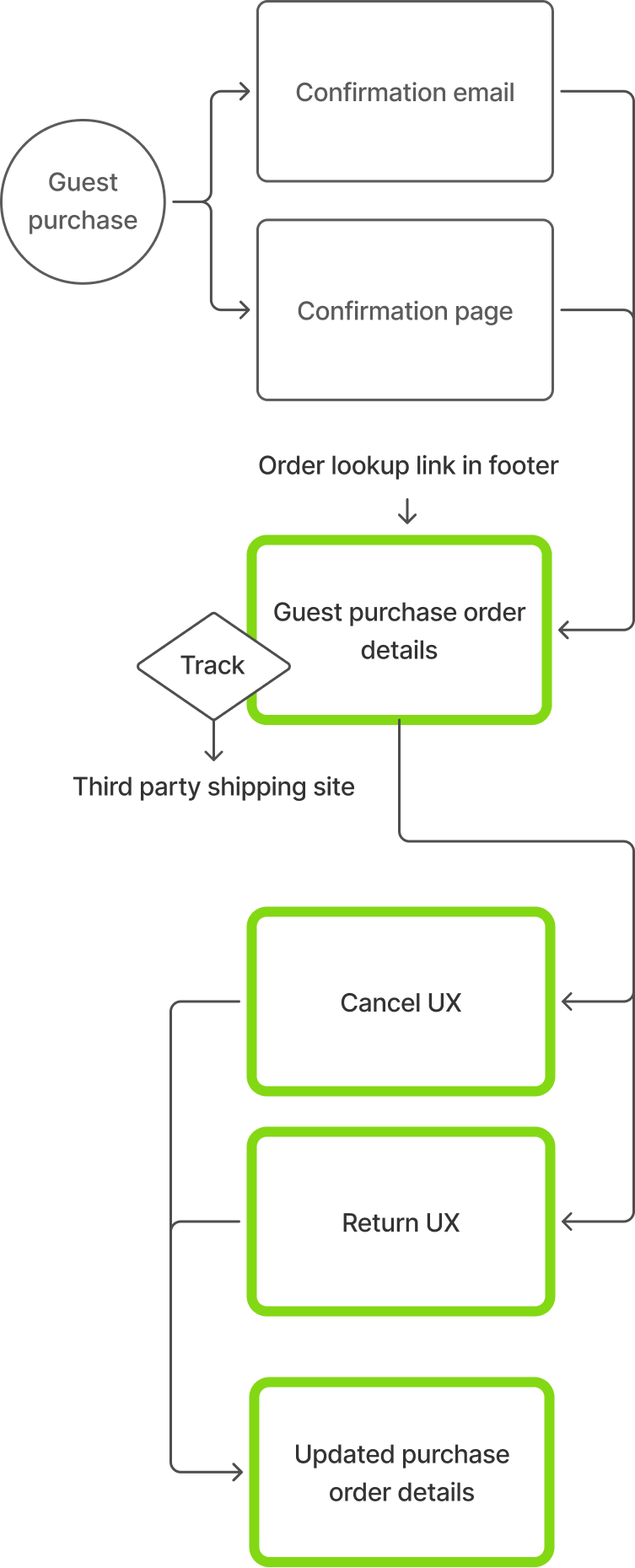
Guest customers could:
- View order details
- Track shipments
- Cancel or return orders
The post-purchase flow mirrored the account-based experience—all within a design system consistent with the web store where the purchase occurred.
Guest order management
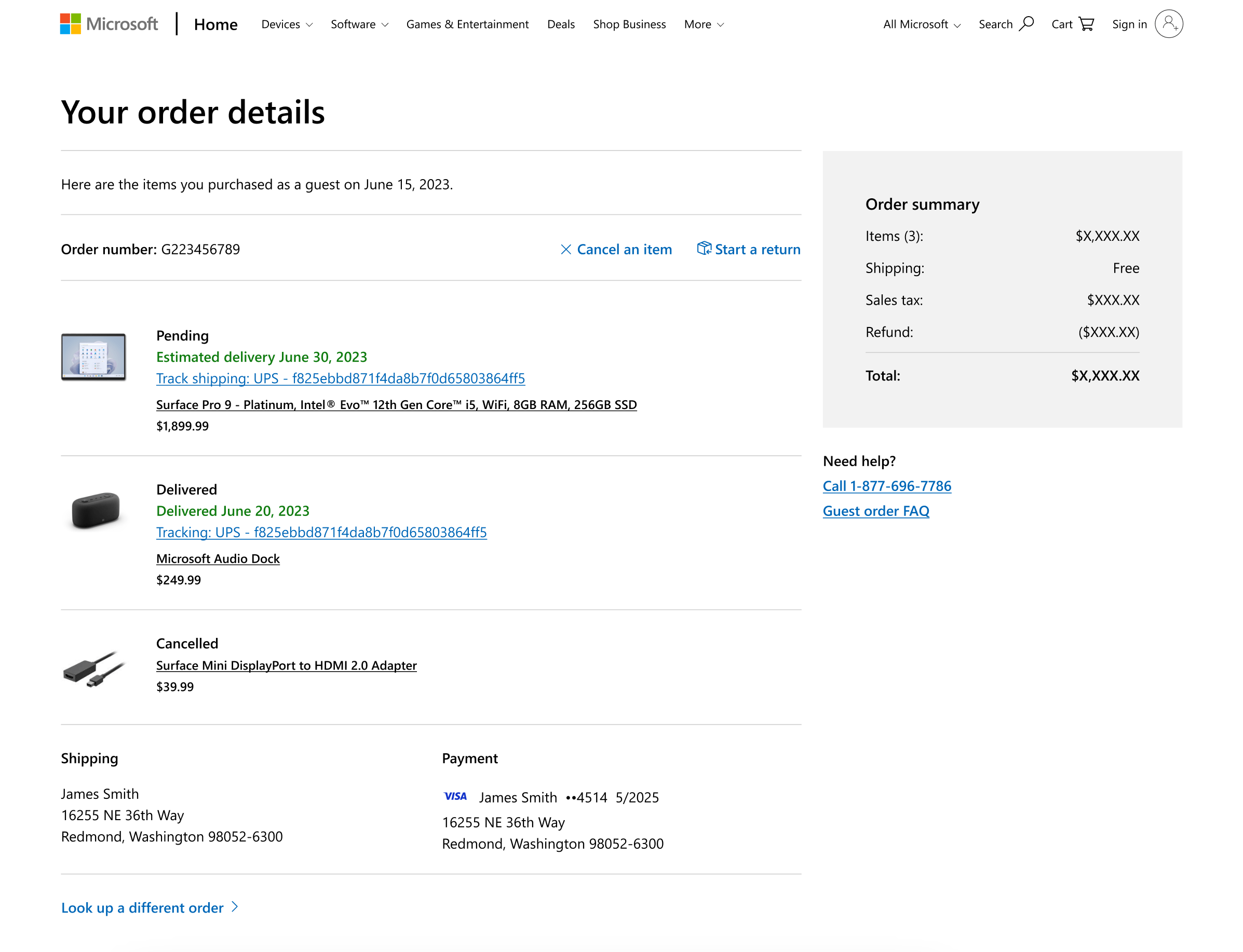
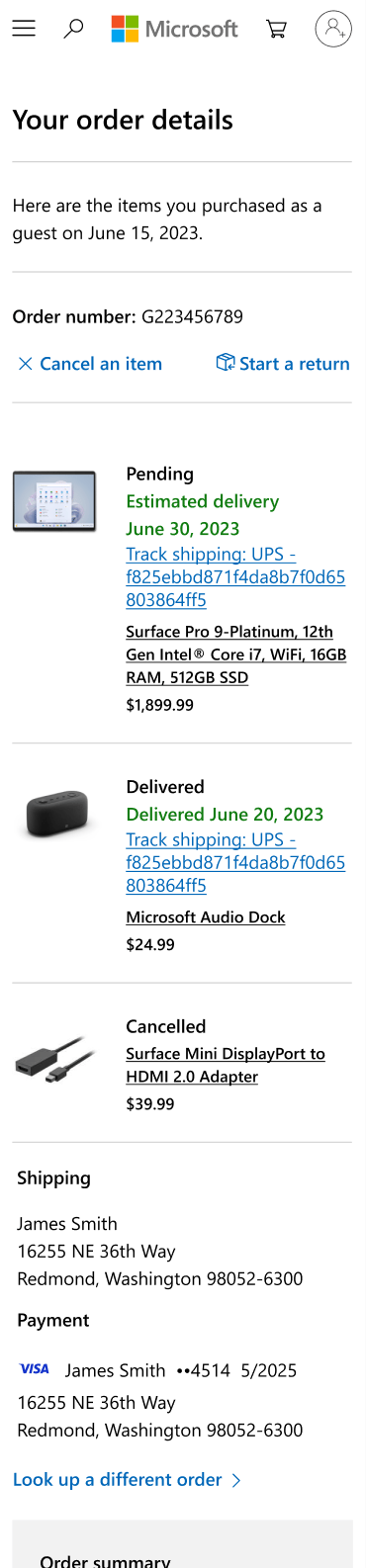
The order details page leverages the same product images, layout, and typography as the cart and guest checkout pages to maintain continuity. It also includes necessary post-purchase content and functionality such as:
- Order number
- Cancel and return actions
- Fulfillment status
- Tracking details
- Line-item pricing, discount, refund, shipping, tax, and total cost
- Shipping and payment details
Tradeoffs
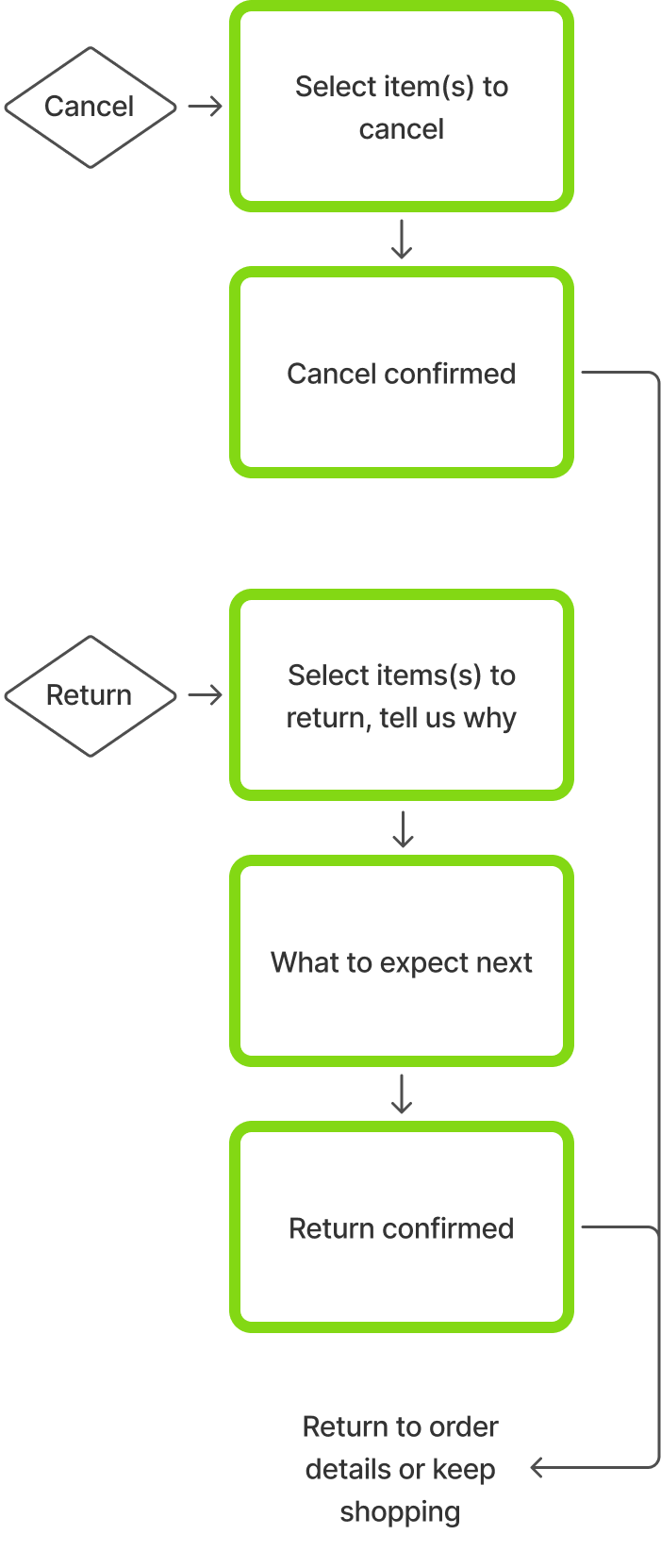
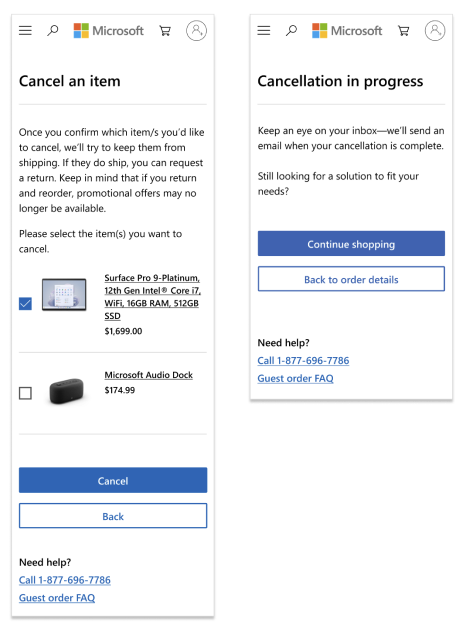
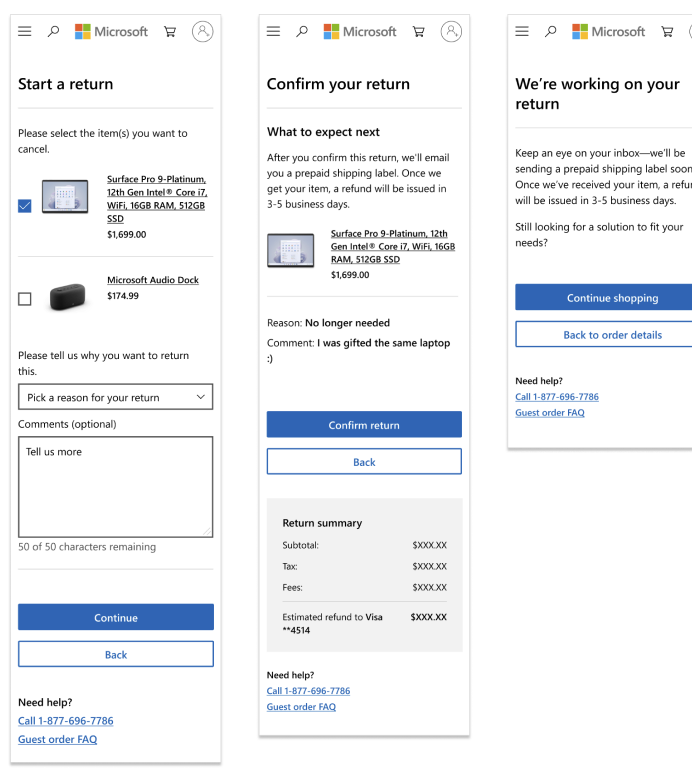
Initially, I proposed modal interactions for the product return and cancelation flows so users would not feel shuttled to separate pages.

Cancel or
Return UX
However, since the guest post-purchase pages were built using the existing account-based cart, checkout, and confirmation frameworks, introducing a modal would have added technical complexity and delayed launch. To minimize engineering effort and accelerate timeframes, I aligned the team on a multi-page flow that worked within the existing architecture.
Launch and impact
The guest checkout feature launched in limited markets with a subset of products to ensure platform stability and mitigate fraud risk.
Early results were promising.
Mobile Safari users purchasing Xbox controllers showed the highest conversion lift, suggesting guest checkout captured customers who previously would not create a Microsoft account.
As confidence grew, traffic expanded to 100% and guest checkout rolled out to 24 international markets.
Key takeaways
My decision to place the guest checkout option directly on the cart page reinforced the value of offering clear choices early in the purchase path.
By advocating for experience continuity, I succeeded in creating a cohesive pre and post purchase experience for guest shoppers.
My collaboration with engineering and ability to make smart decisions when considering tradeoffs demonstrates my ability to work within technical realities and maintain momentum.
Return to all projects →
Kristin Standiford
Microsoft Store
Reducing purchase friction with guest checkout
Role: Lead UX DesignerTeam: Product, Engineering, Marketing, DesignPlatforms: Microsoft.com and Xbox.com
GoalReduce purchase friction and increase sales by enabling guest checkout.
Impact
- Orders increased 20%
- Revenue increased 22%
- $18.2M projected annual revenue from Microsoft.com
- $6M projected revenue over 3 years from Xbox.com
The problem
Microsoft’s consumer web store historically required customers to sign in with an account before continuing to checkout. While this supported account growth and ecosystem engagement, it also introduced friction for users.
Customers without an account—or those who didn’t recall they had one—frequently abandoned their carts.
Guest checkout is a standard feature among competitors, so Microsoft shifted strategy to capture more sales by removing barriers during purchase and deferring account sign in or creation during product setup.
Scope
Because guest purchases are not tied to a Microsoft account, the feature also required new web store post-purchase pages that allowed guests to:
- See order details
- Make returns or cancellations
These experiences needed to maintain parity with account-based order management.
Key design decisions
Designing guest checkout required balancing business goals, platform constraints, and long-term scalability. Three decisions shaped the final solution:
Entry point
Where and when to present the guest checkout option.
Cohesion
Ensuring post-purchase experiences felt consistent with the shopping journey.
Speed to Launch
Designing within existing platform constraints to avoid delaying the release.
Checkout entry point
Common industry patters included:
- Guest checkout, account checkout, and account creation directly on the cart page
- Interstitial pages between cart and checkout that offered multiple purchase paths
I explored introducing an interstitial page between cart and checkout that could also support future payment options such as Apple Pay, Google Pay, and PayPal.

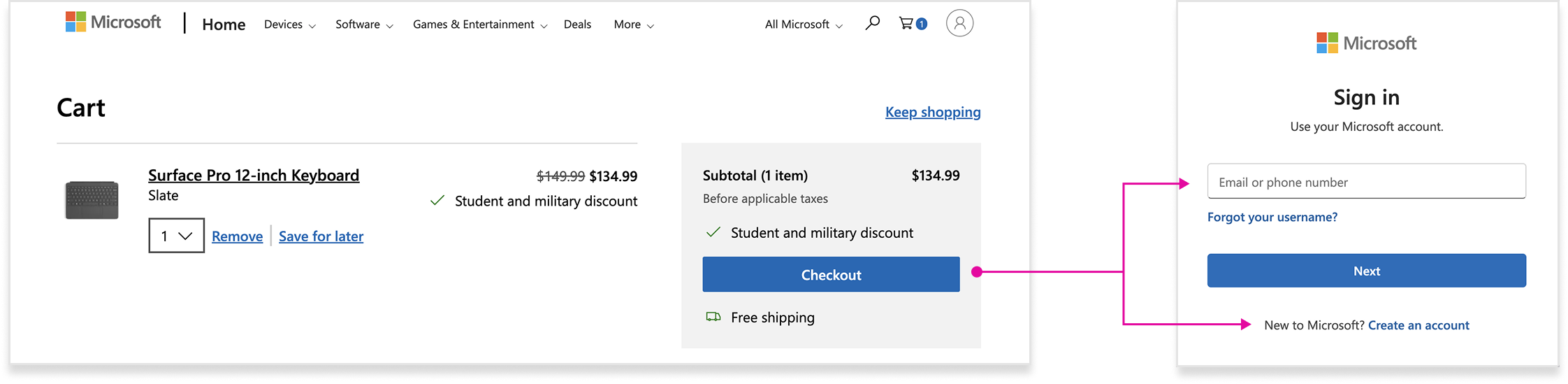
However, because guest checkout was new for Microsoft customers—and the business still emphasized purchasing while signed into a Microsoft account—I surfaced both checkout options directly on the cart page.
This ensured customers clearly understood their choices while maintaining neutral positioning between the two paths.
Cohesive post-purchase experience
Microsoft’s existing order management experiences lived on various account-based platforms with different design systems, none of which matched the web store’s patterns.
I advocated for creating a new experience that remained consistent with the web store where guest purchases were completed.
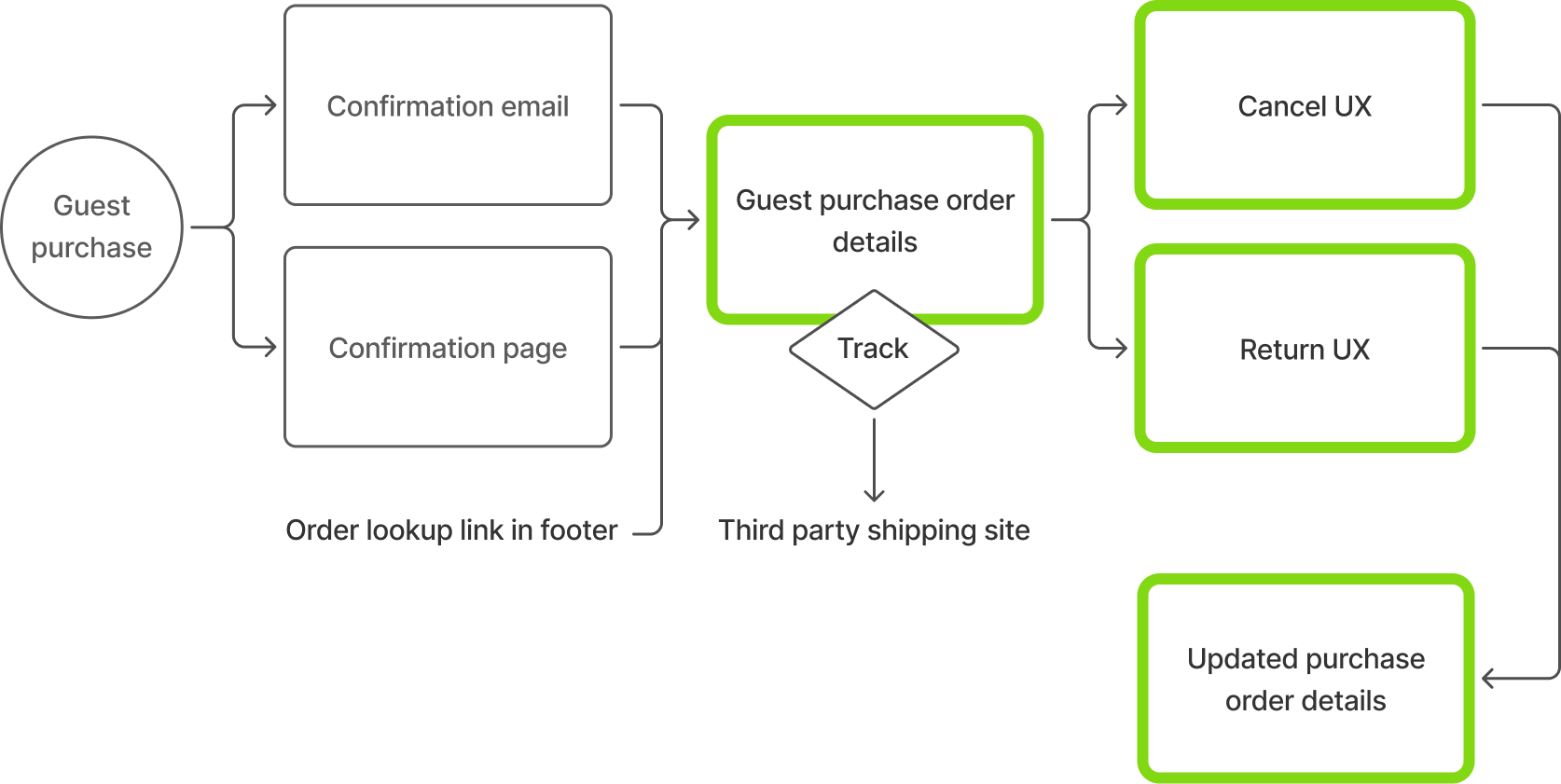
Guest customers could:
- View order details
- Track shipments
- Cancel or return orders
The post-purchase flow mirrored the account-based experience—all within a design system consistent with the web store where the purchase occurred.
Guest order management
The order details page leverages the same product images, layout, and typography as the cart and guest checkout pages to maintain continuity. It also includes necessary post-purchase content and functionality such as:
- Order number
- Cancel and return actions
- Fulfillment status
- Tracking details
- Line-item pricing, discount, refund, shipping, tax, and total cost
- Shipping and payment details
Tradeoffs
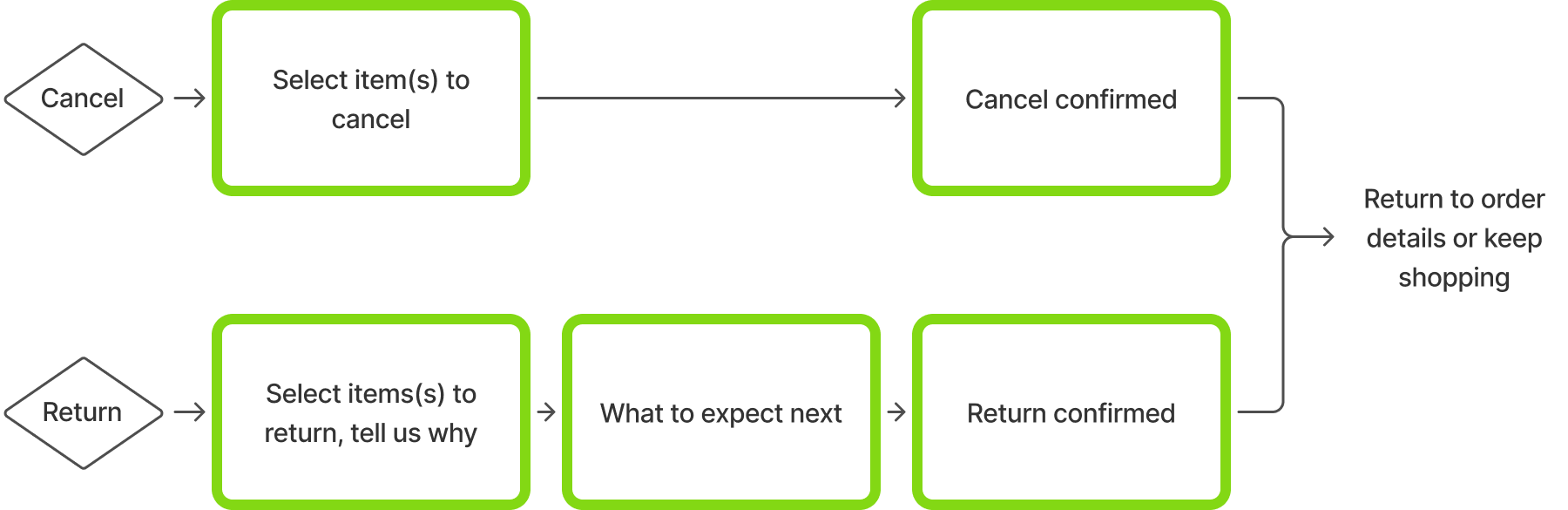
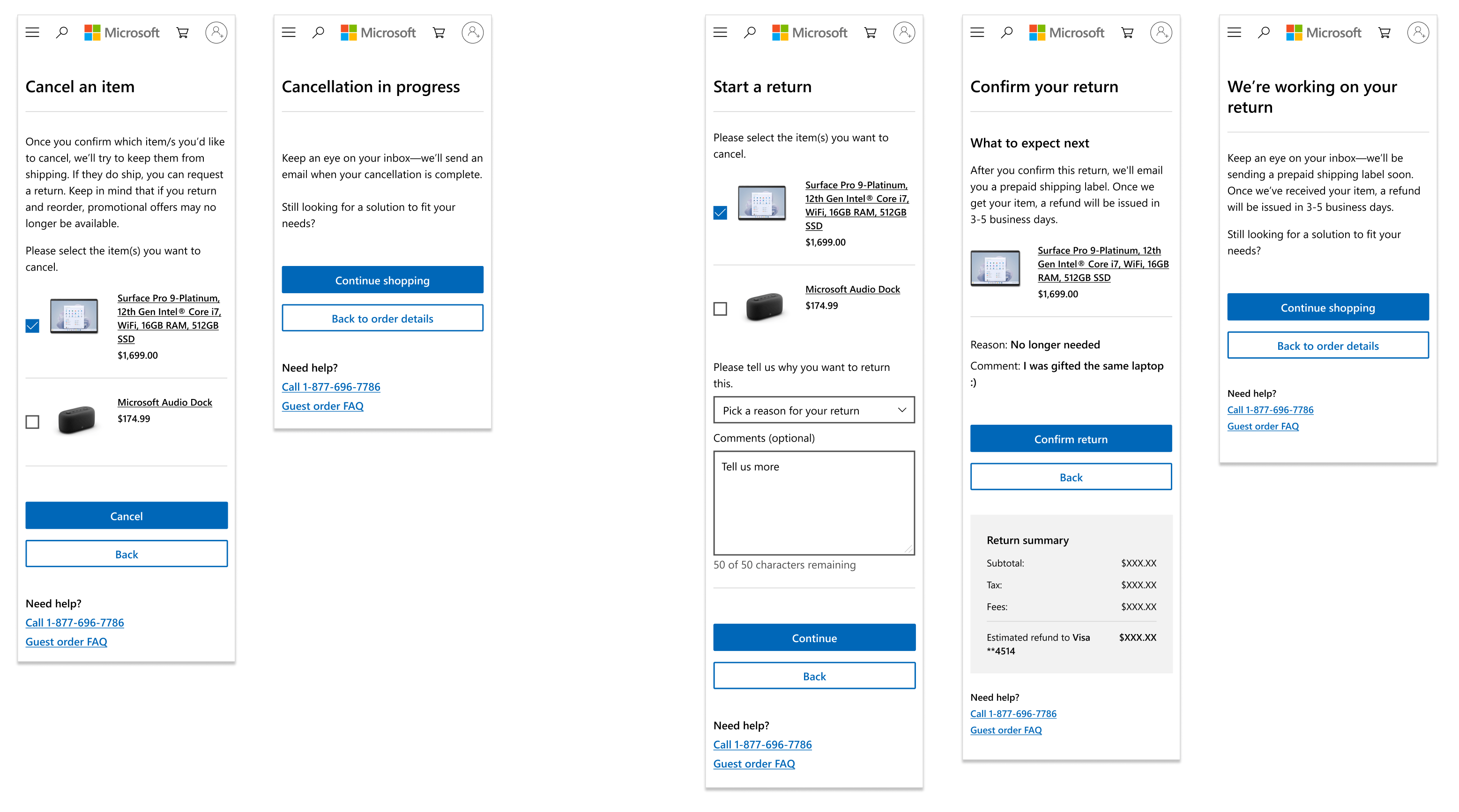
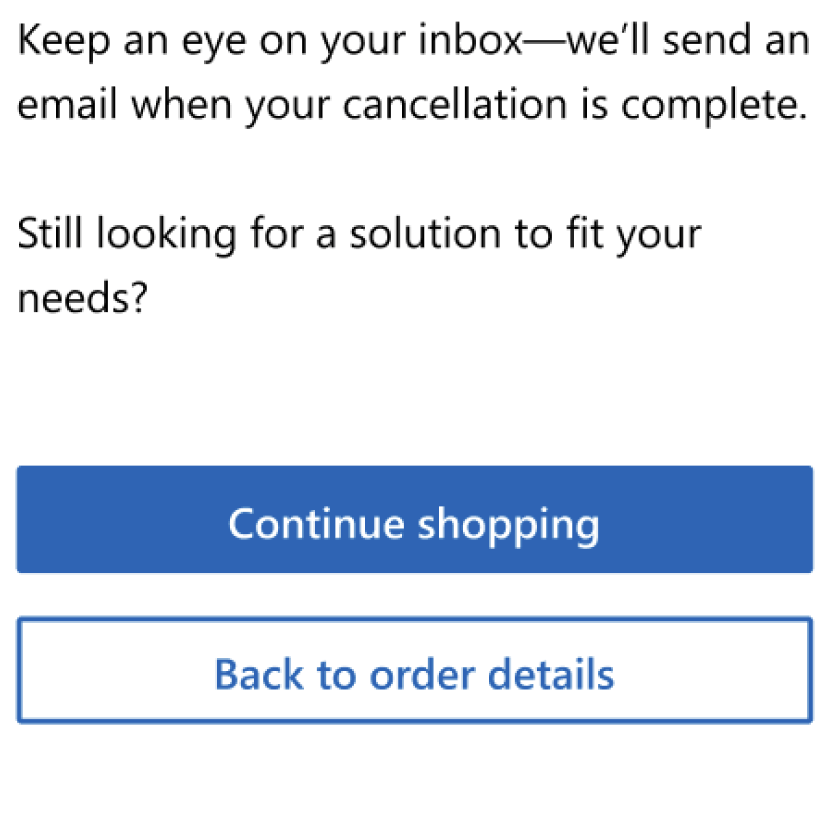
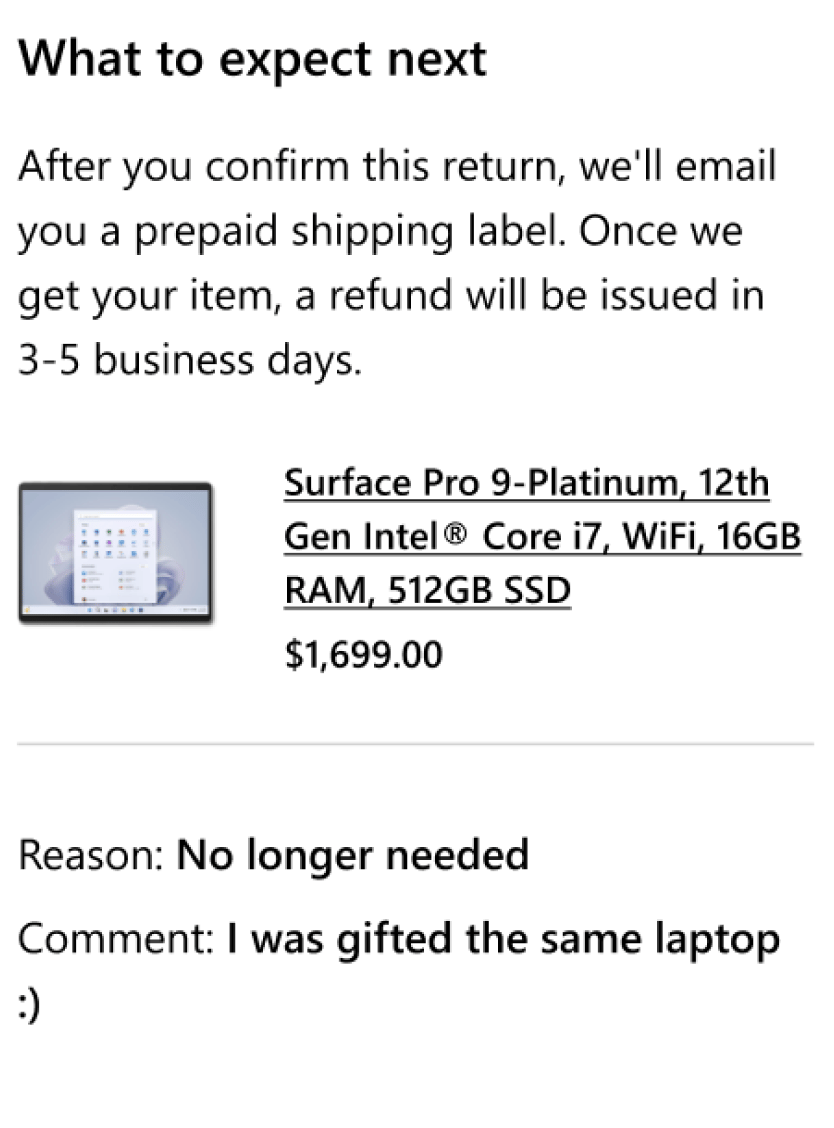
Initially, I proposed modal interactions for the product return and cancelation flows so users would not feel shuttled to separate pages.
Cancel or
Return UX
However, since the guest post-purchase pages were built using the existing account-based cart, checkout, and confirmation frameworks, introducing a modal would have added technical complexity and delayed launch. To minimize engineering effort and accelerate timeframes, I aligned the team on a multi-page flow that worked within the existing architecture.
Launch and impact
The guest checkout feature launched in limited markets with a subset of products to ensure platform stability and mitigate fraud risk.
Early results were promising.
Mobile Safari users purchasing Xbox controllers showed the highest conversion lift, suggesting guest checkout captured customers who previously would not create a Microsoft account.
As confidence grew, traffic expanded to 100% and guest checkout rolled out to 24 international markets.
Key takeaways
My decision to place the guest checkout option directly on the cart page reinforced the value of offering clear choices early in the purchase path.
By advocating for experience continuity, I succeeded in creating a cohesive pre and post purchase experience for guest shoppers.
My collaboration with engineering and ability to make smart decisions when considering tradeoffs demonstrates my ability to work within technical realities and maintain momentum.
Return to all projects →
Kristin Standiford
Microsoft Store
Reducing purchase friction with guest checkout
Role: Lead UX DesignerTeam: Product, Engineering, Marketing, DesignPlatforms: Microsoft.com and Xbox.com
GoalReduce purchase friction and increase sales by enabling guest checkout.
Impact
- Orders increased 20%
- Revenue increased 22%
- $18.2M projected annual revenue from Microsoft.com
- $6M projected revenue over 3 years from Xbox.com
The problem
Microsoft’s consumer web store historically required customers to sign in with an account before continuing to checkout. While this supported account growth and ecosystem engagement, it also introduced friction for users.
Customers without an account—or those who didn’t recall they had one—frequently abandoned their carts.
Guest checkout is a standard feature among competitors, so Microsoft shifted strategy to capture more sales by removing barriers during purchase and deferring account sign in or creation during product setup.
Scope
Because guest purchases are not tied to a Microsoft account, the feature also required new web store post-purchase pages that allowed guests to:
- See order details
- Make returns or cancellations
These experiences needed to maintain parity with account-based order management.
Key design decisions
Designing guest checkout required balancing business goals, platform constraints, and long-term scalability. Three decisions shaped the final solution:
Entry point
Where and when to present the guest checkout option.
Cohesion
Ensuring post-purchase experiences felt consistent with the shopping journey.
Speed to Launch
Designing within existing platform constraints to avoid delaying the release.
Checkout entry point
Common industry patters included:
- Guest checkout, account checkout, and account creation directly on the cart page
- Interstitial pages between cart and checkout that offered multiple purchase paths
I explored introducing an interstitial page between cart and checkout that could also support future payment options such as Apple Pay, Google Pay, and PayPal.
However, because guest checkout was new for Microsoft customers—and the business still emphasized purchasing while signed into a Microsoft account—I surfaced both checkout options directly on the cart page.
This ensured customers clearly understood their choices while maintaining neutral positioning between the two paths.
Cohesive post-purchase experience
Microsoft’s existing order management experiences lived on various account-based platforms with different design systems, none of which matched the web store’s patterns.
I advocated for creating a new experience that remained consistent with the web store where guest purchases were completed.
Guest customers could:
- View order details
- Track shipments
- Cancel or return orders
The post-purchase flow mirrored the account-based experience—all within a design system consistent with the web store where the purchase occurred.
Guest order management
The order details page leverages the same product images, layout, and typography as the cart and guest checkout pages to maintain continuity. It also includes necessary post-purchase content and functionality such as:
- Order number
- Cancel and return actions
- Fulfillment status
- Tracking details
- Line-item pricing, discount, refund, shipping, tax, and total cost
- Shipping and payment details
Tradeoffs
Initially, I proposed modal interactions for the product return and cancelation flows so users would not feel shuttled to separate pages.
Cancel or
Return UX
However, since the guest post-purchase pages were built using the existing account-based cart, checkout, and confirmation frameworks, introducing a modal would have added technical complexity and delayed launch. To minimize engineering effort and accelerate timeframes, I aligned the team on a multi-page flow that worked within the existing architecture.
Launch and impact
The guest checkout feature launched in limited markets with a subset of products to ensure platform stability and mitigate fraud risk.
Early results were promising.
Mobile Safari users purchasing Xbox controllers showed the highest conversion lift, suggesting guest checkout captured customers who previously would not create a Microsoft account.
As confidence grew, traffic expanded to 100% and guest checkout rolled out to 24 international markets.
Key takeaways
My decision to place the guest checkout option directly on the cart page reinforced the value of offering clear choices early in the purchase path.
By advocating for experience continuity, I succeeded in creating a cohesive pre and post purchase experience for guest shoppers.
My collaboration with engineering and ability to make smart decisions when considering tradeoffs demonstrates my ability to work within technical realities and maintain momentum.
Return to all projects →