Apple Pay and Google Pay
Promoting Express Checkout on Xbox.com
Role: Senior UX DesignerTeam: Payments, Product, Engineering, Legal, DesignPlatforms: Xbox.com
GoalPromote Apple Pay and Google Pay as Express Checkout options by surfacing them earlier in the purchase flow, reducing friction and encouraging adoption of faster wallet-based payment methods.
Although the experience needed to be fully responsive, the initiative prioritized the mobile experience first, establishing patterns that would inform future Xbox mobile commerce and app experiences.
Opportunity
The payments team wanted to prominently place Apple Pay and Google Pay directly on the purchase screen.
Because this initiative would establish mobile payment patterns for future Xbox app experiences—and that team had not yet identified a scalable solution in time for the web launch—I was brought in to lead the UX effort and help define the approach.
My experience designing transactional flows positioned me to quickly evaluate the constraints across business, engineering, and legal teams and translate them into a scalable payment experience.
The problem
Game purchasers on Xbox.com could choose from a wide array of payment methods, including:
- Credit cards
- PayPal
- Venmo
- Paysafe
- Apple Pay
- Google Pay
- Gift card balances
- Xbox MasterCard loyalty and rewards
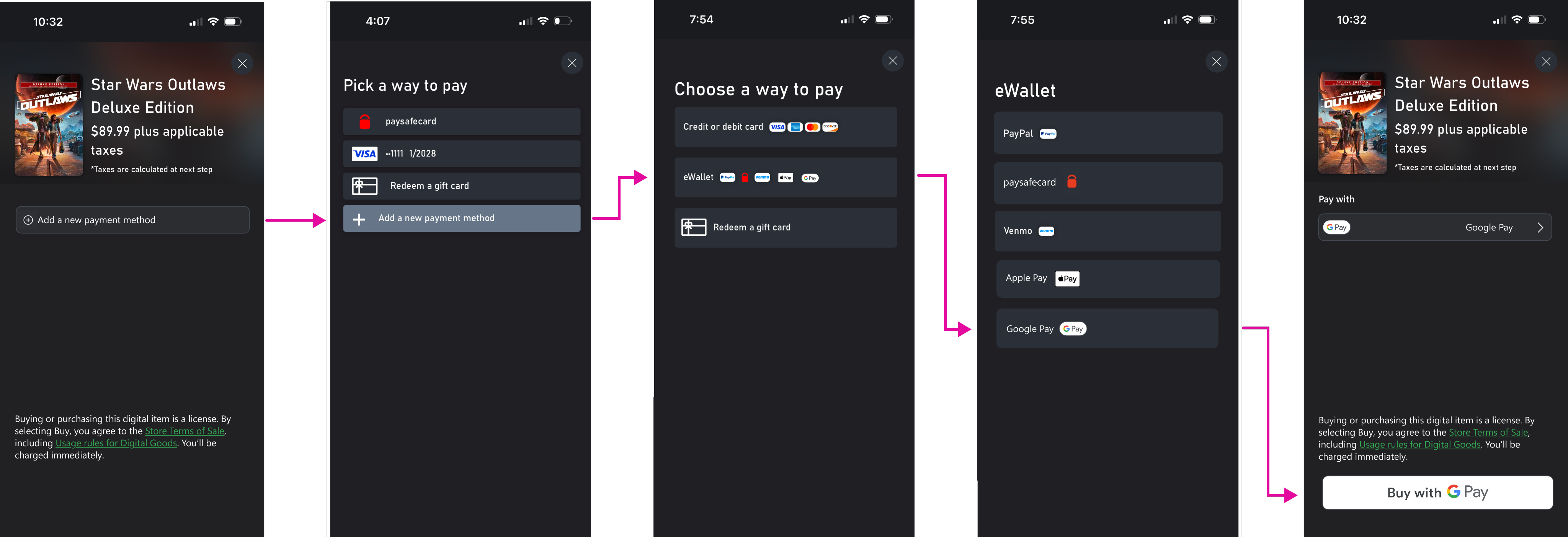
Selecting or updating a payment method required navigating several screens, regardless of device.
This example shows the mobile experience, where users move through four steps from the purchase screen simply to select Google Pay.
The challenge
The Xbox app team’s initial mobile-first wireframes prioritized Apple Pay and Google Pay at the top of the payment screen.
However, this surfaced competing priorities across internal stakeholders.
Teams responsible for gift card balances and Xbox MasterCard loyalty and rewards were concerned that emphasizing Apple Pay and Google Pay would reduce visibility for their offerings.
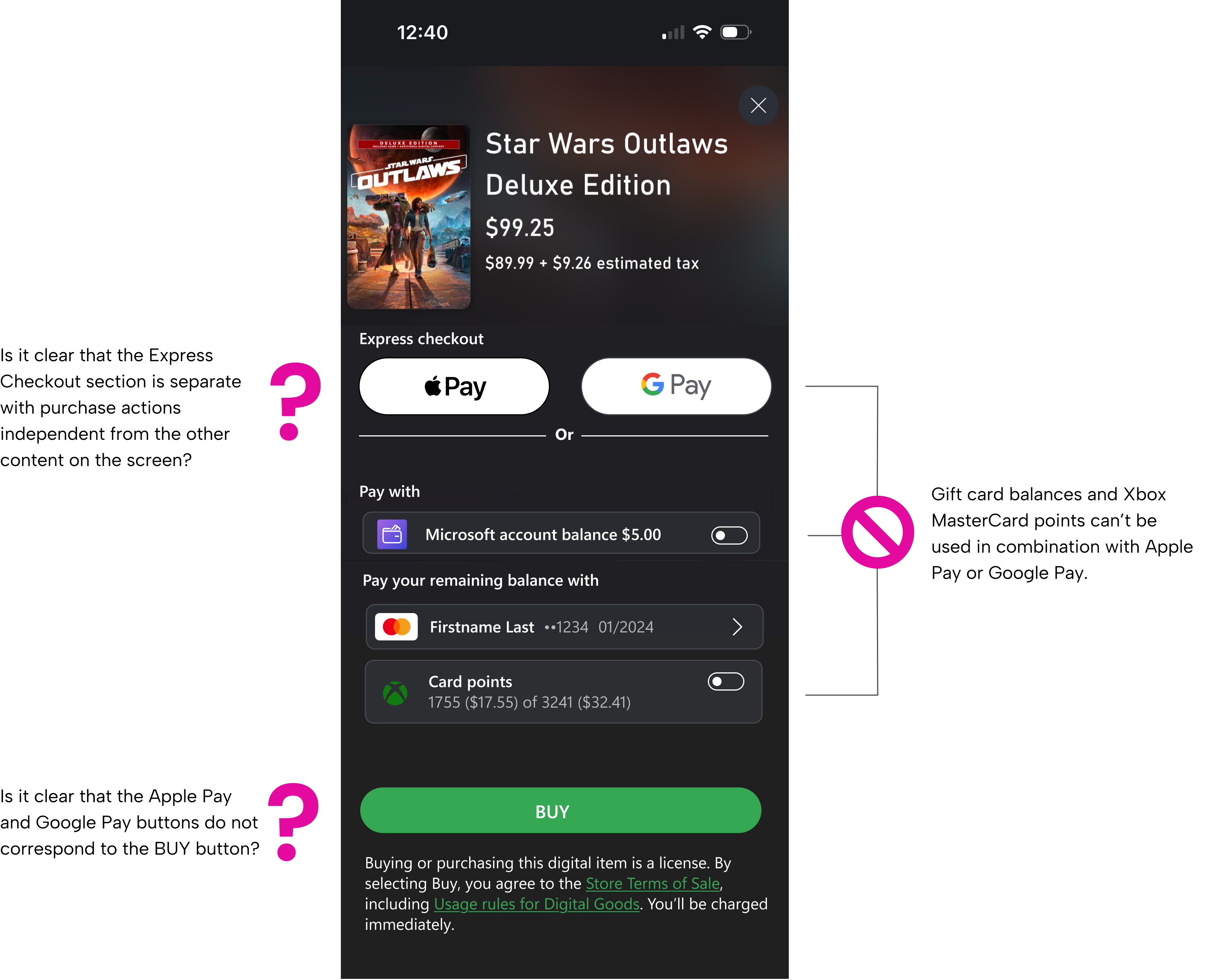
Because Apple Pay and Google Pay could not be used in combination with rewards or gift balances, presenting all options simultaneously created:
- Potential frustration at the inability use use points or balances with Apple Pay and Google Pay
- Visual noise and interaction friction
- Potential paradox of choice
My design proposal
To balance these competing priorities, I proposed introducing conditional logic into the payment experience.
Apple Pay and Google Pay would be surfaced prominently only when users did not have gift balances or reward points available to redeem or earn by using their Xbox MasterCard.
This approach:
- Reduced visual clutter
- Prevented incompatible payment combinations
I also refined the copy to clearly communicate that Express Checkout represents a separate purchase path from other payment methods.
To ensure the wallet buttons integrated seamlessly with the Xbox design system, I reviewed Apple Pay and Google Pay developer documentation and confirmed that their button corner radii could be customized to match the surrounding UI.
Legal roadblock
As the design evolved, credit card issuers raised brand visibility requirements.
Microsoft had contractual obligations to present credit card payment options at parity with other payment methods.
While this had not been a blocker in previous flows, the new emphasis on Express Checkout made compliance a critical constraint.

Strategic pivot
To better understand real purchasing behavior, I requested payment analytics for Xbox.com transactions.
The data revealed that most purchasers already had a saved credit card on file, which often represented the fastest path to completing a purchase.
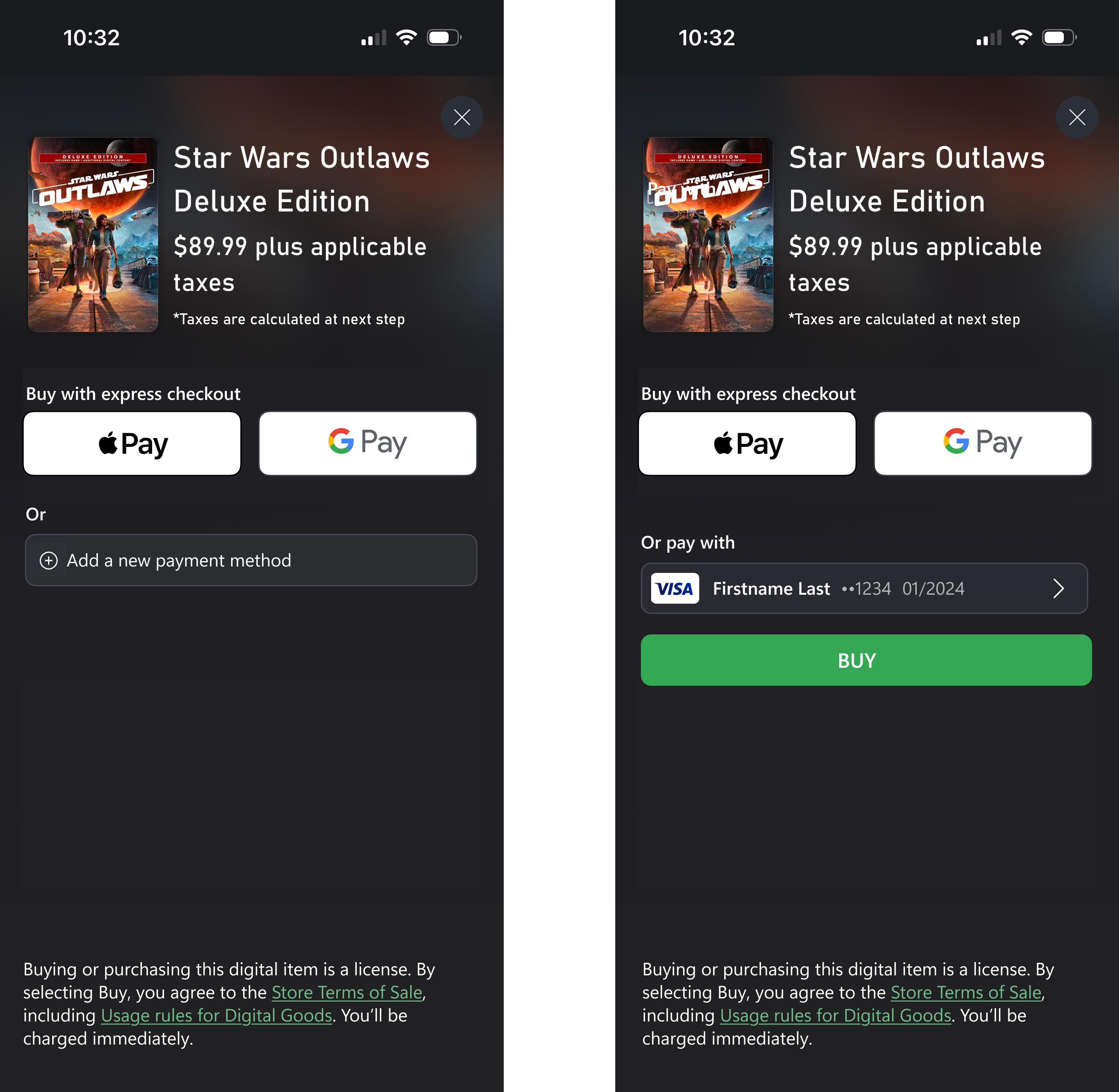
While the business goal was to gradually shift behavior toward Apple Pay and Google Pay, this insight suggested that leading with the saved card would reduce friction while still introducing wallet payments prominently.
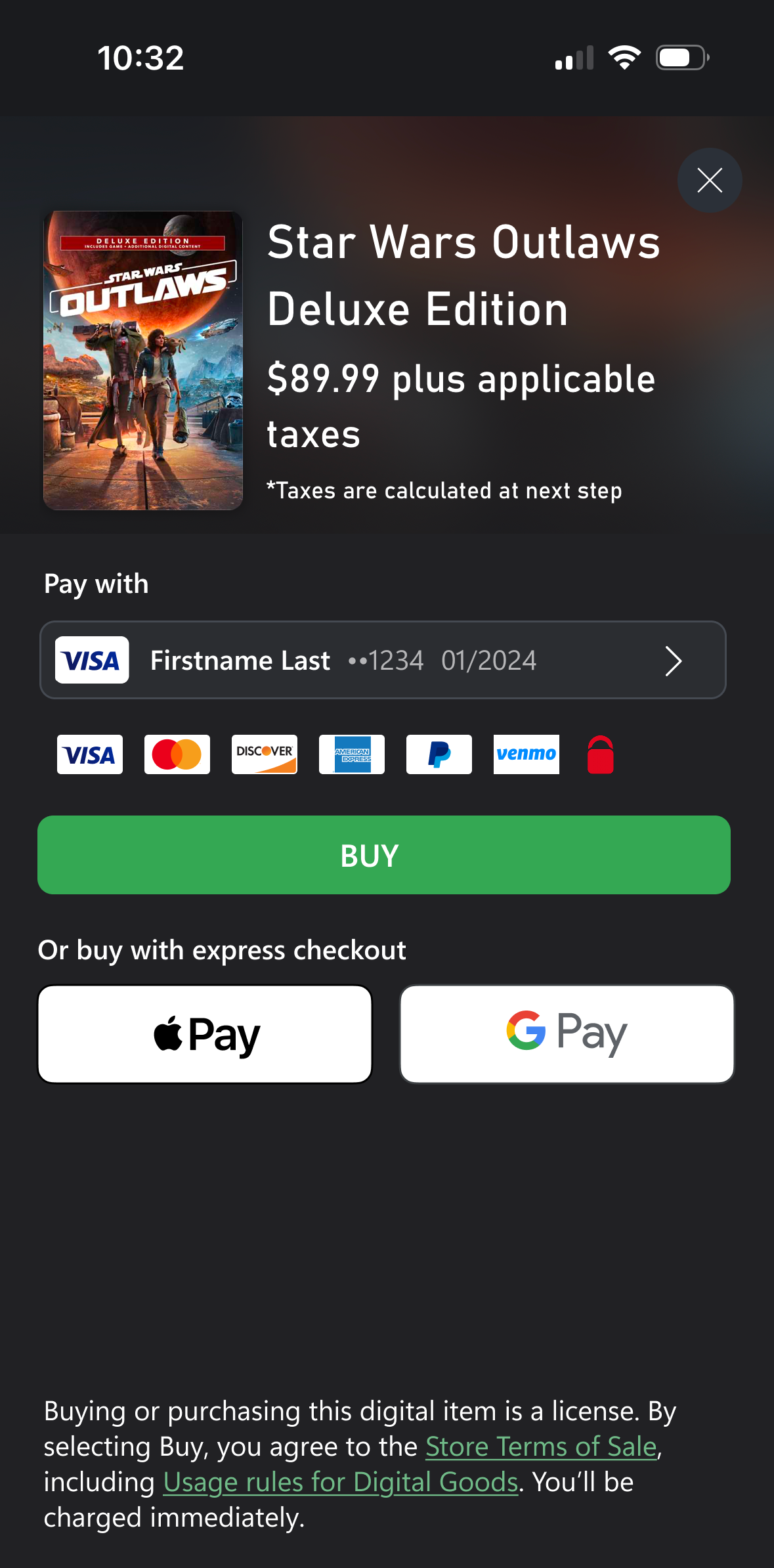
I proposed a revised payment hierarchy:
- Saved credit card
- Show all available payment methods
- Maintain prominent access to Apple Pay and Google Pay
This balanced real user behavior with long-term product goals while remaining compliant with credit card brand requirements.
Final Design
After navigating competing business priorities, legal constraints, and real-world user behavior, I delivered a responsive payment experience optimized for mobile.
My design prominently surfaced Apple Pay and Google Pay while respecting users’ existing default payment methods and complying with contractual credit card requirements.
My contributions to this team established a scalable pattern for future mobile Xbox purchase experiences.
Return to all projects →
Kristin Standiford
Apple Pay and Google Pay
Promoting Express Checkout on Xbox.com
Role: Senior UX DesignerTeam: Payments, Product, Engineering, Legal, DesignPlatforms: Xbox.com
GoalPromote Apple Pay and Google Pay as Express Checkout options by surfacing them earlier in the purchase flow, reducing friction and encouraging adoption of faster wallet-based payment methods.
Although the experience needed to be fully responsive, the initiative prioritized the mobile experience first, establishing patterns that would inform future Xbox mobile commerce and app experiences.
Opportunity
The payments team wanted to prominently place Apple Pay and Google Pay directly on the purchase screen.
Because this initiative would establish mobile payment patterns for future Xbox app experiences—and that team had not yet identified a scalable solution in time for the web launch—I was brought in to lead the UX effort and help define the approach.
My experience designing transactional flows positioned me to quickly evaluate the constraints across business, engineering, and legal teams and translate them into a scalable payment experience.
The problem
Game purchasers on Xbox.com could choose from a wide array of payment methods, including:
- Credit cards
- PayPal
- Venmo
- Paysafe
- Apple Pay
- Google Pay
- Gift card balances
- Xbox MasterCard loyalty and rewards
Selecting or updating a payment method required navigating several screens, regardless of device.
This example shows the mobile experience, where users move through four steps from the purchase screen simply to select Google Pay.
The challenge
The Xbox app team’s initial mobile-first wireframes prioritized Apple Pay and Google Pay at the top of the payment screen.
However, this surfaced competing priorities across internal stakeholders.
Teams responsible for gift card balances and Xbox MasterCard loyalty and rewards were concerned that emphasizing Apple Pay and Google Pay would reduce visibility for their offerings.
Because Apple Pay and Google Pay could not be used in combination with rewards or gift balances, presenting all options simultaneously created:
- Potential frustration at the inability use use points or balances with Apple Pay and Google Pay
- Visual noise and interaction friction
- Potential paradox of choice
My design proposal
To balance these competing priorities, I proposed introducing conditional logic into the payment experience.
Apple Pay and Google Pay would be surfaced prominently only when users did not have gift balances or reward points available to redeem or earn by using their Xbox MasterCard.
This approach:
- Reduced visual clutter
- Prevented incompatible payment combinations
I also refined the copy to clearly communicate that Express Checkout represents a separate purchase path from other payment methods.
To ensure the wallet buttons integrated seamlessly with the Xbox design system, I reviewed Apple Pay and Google Pay developer documentation and confirmed that their button corner radii could be customized to match the surrounding UI.
Legal roadblock
As the design evolved, credit card issuers raised brand visibility requirements.
Microsoft had contractual obligations to present credit card payment options at parity with other payment methods.
While this had not been a blocker in previous flows, the new emphasis on Express Checkout made compliance a critical constraint.
Strategic pivot
To better understand real purchasing behavior, I requested payment analytics for Xbox.com transactions.
The data revealed that most purchasers already had a saved credit card on file, which often represented the fastest path to completing a purchase.
While the business goal was to gradually shift behavior toward Apple Pay and Google Pay, this insight suggested that leading with the saved card would reduce friction while still introducing wallet payments prominently.
I proposed a revised payment hierarchy:
- Saved credit card
- Show all available payment methods
- Maintain prominent access to Apple Pay and Google Pay
This balanced real user behavior with long-term product goals while remaining compliant with credit card brand requirements.
Final Design
After navigating competing business priorities, legal constraints, and real-world user behavior, I delivered a responsive payment experience optimized for mobile.
My design prominently surfaced Apple Pay and Google Pay while respecting users’ existing default payment methods and complying with contractual credit card requirements.
My contributions to this team established a scalable pattern for future mobile Xbox purchase experiences.
Return to all projects →
Kristin Standiford
Apple Pay and Google Pay
Promoting Express Checkout on Xbox.com
Role: Senior UX DesignerTeam: Payments, Product, Engineering, Legal, DesignPlatforms: Xbox.com
GoalPromote Apple Pay and Google Pay as Express Checkout options by surfacing them earlier in the purchase flow, reducing friction and encouraging adoption of faster wallet-based payment methods.
Although the experience needed to be fully responsive, the initiative prioritized the mobile experience first, establishing patterns that would inform future Xbox mobile commerce and app experiences.
Opportunity
The payments team wanted to prominently place Apple Pay and Google Pay directly on the purchase screen.
Because this initiative would establish mobile payment patterns for future Xbox app experiences—and that team had not yet identified a scalable solution in time for the web launch—I was brought in to lead the UX effort and help define the approach.
My experience designing transactional flows positioned me to quickly evaluate the constraints across business, engineering, and legal teams and translate them into a scalable payment experience.
The problem
Game purchasers on Xbox.com could choose from a wide array of payment methods, including:
- Credit cards
- PayPal
- Venmo
- Paysafe
- Apple Pay
- Google Pay
- Gift card balances
- Xbox MasterCard loyalty and rewards
Selecting or updating a payment method required navigating several screens, regardless of device.
This example shows the mobile experience, where users move through four steps from the purchase screen simply to select Google Pay.
The challenge
The Xbox app team’s initial mobile-first wireframes prioritized Apple Pay and Google Pay at the top of the payment screen.
However, this surfaced competing priorities across internal stakeholders.
Teams responsible for gift card balances and Xbox MasterCard loyalty and rewards were concerned that emphasizing Apple Pay and Google Pay would reduce visibility for their offerings.
Because Apple Pay and Google Pay could not be used in combination with rewards or gift balances, presenting all options simultaneously created:
- Potential frustration at the inability use use points or balances with Apple Pay and Google Pay
- Visual noise and interaction friction
- Potential paradox of choice
My design proposal
To balance these competing priorities, I proposed introducing conditional logic into the payment experience.
Apple Pay and Google Pay would be surfaced prominently only when users did not have gift balances or reward points available to redeem or earn by using their Xbox MasterCard.
This approach:
- Reduced visual clutter
- Prevented incompatible payment combinations
I also refined the copy to clearly communicate that Express Checkout represents a separate purchase path from other payment methods.
To ensure the wallet buttons integrated seamlessly with the Xbox design system, I reviewed Apple Pay and Google Pay developer documentation and confirmed that their button corner radii could be customized to match the surrounding UI.
Legal roadblock
As the design evolved, credit card issuers raised brand visibility requirements.
Microsoft had contractual obligations to present credit card payment options at parity with other payment methods.
While this had not been a blocker in previous flows, the new emphasis on Express Checkout made compliance a critical constraint.
Strategic pivot
To better understand real purchasing behavior, I requested payment analytics for Xbox.com transactions.
The data revealed that most purchasers already had a saved credit card on file, which often represented the fastest path to completing a purchase.
While the business goal was to gradually shift behavior toward Apple Pay and Google Pay, this insight suggested that leading with the saved card would reduce friction while still introducing wallet payments prominently.
I proposed a revised payment hierarchy:
- Saved credit card
- Show all available payment methods
- Maintain prominent access to Apple Pay and Google Pay
This balanced real user behavior with long-term product goals while remaining compliant with credit card brand requirements.
Final Design
After navigating competing business priorities, legal constraints, and real-world user behavior, I delivered a responsive payment experience optimized for mobile.
My design prominently surfaced Apple Pay and Google Pay while respecting users’ existing default payment methods and complying with contractual credit card requirements.
My contributions to this team established a scalable pattern for future mobile Xbox purchase experiences.
Return to all projects →